Architecture
The UI design for Pledger.io
The user interface is a React-based application. It is built up using the following frameworks and tools:
- React, used as the UI framework.
- Typescript, used as the programming language.
- Chart.js, used for the rendering of the various charts inside the application.
- Primereact, used as the primary UI component library for the application.
- axios, used for the communication with the REST-api.
High-level overview
The Pledger.io application follows a layered architecture pattern, separating concerns into distinct layers that interact with each other in a controlled manner. This document describes the high-level architecture of the application, including its main layers and components.
Architecture Diagram
The following diagram illustrates the high-level architecture of the Pledger.io application:
As can be seen, there is one main entry point the user interacts with, the Pledger.io component.
Each page is represented in a route, but multiple routes can lead to the same page.
Every page can consist out of multiple components.
The components and pages can use the repository layer to access the backend application.
Current application shell design
The current UI is built around a consistent app shell:
- A primary sidebar with top-level sections.
- A top app header with contextual actions and page title.
- Section-local navigation for in-section destinations.
- A command launcher (quick search) to jump to pages and actions.
This model reduces navigation depth while keeping all functional areas discoverable.
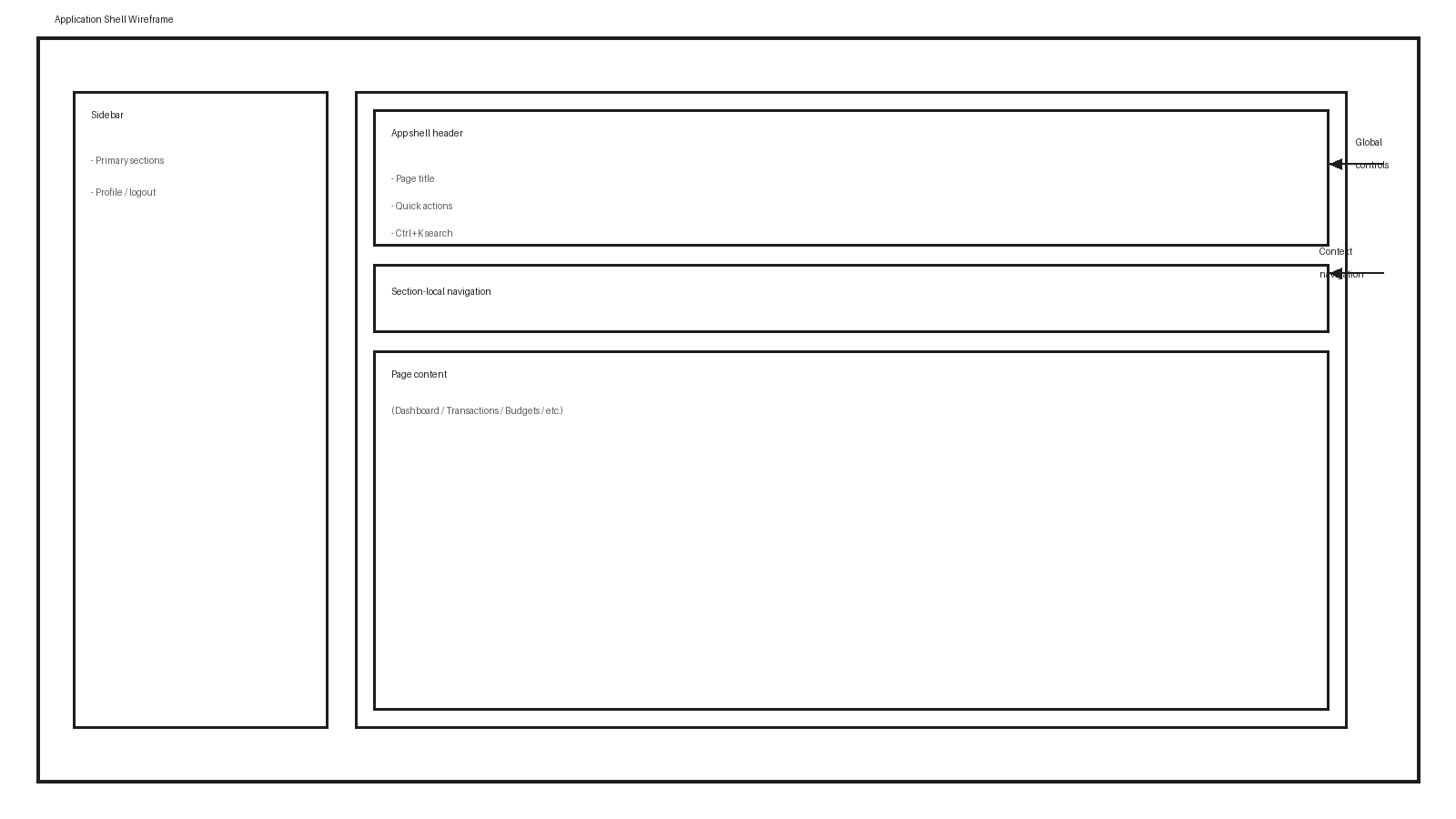
Navigation model
The navigation is intentionally split into two levels:
- Primary section navigation in the sidebar (overview, transactions, budgets, accounts, automation, settings).
- Local section navigation that exposes destinations within the active section.
In addition, command search allows keyboard-first navigation using Ctrl+K.
Visual system and theming
The UI uses semantic design tokens to keep visual behavior consistent across components and themes. Key token groups include:
- Spacing and radius tokens
- Interactive state tokens (hover, active, disabled)
- Focus visibility tokens
- Surface and border tokens
- Badge/label tokens
Theme files define concrete values per theme (light, dark, navy), while shared styling logic remains centralized. This allows brand updates and contrast improvements without changing component logic.
Architectural Layers
Entry Points
- index.jsx: The main entry point of the application that bootstraps the React application.
- pledger-io.tsx: The main application component that sets up the application context and routing.
Pages
Pages are React components that represent full screens in the application. They include:
- Dashboard: Action-first overview of balance, budget status, and spending trends.
- Authentication: Login and registration flows.
- Transactions: Income/expense, transfers, import overview/start import, categories.
- Budgets: First-budget setup, monthly overview, category-level follow-up actions.
- Accounts: Own/creditor/debtor/liability account management and reconciliation.
- Contracts: Recurring contract management.
- Reports: Financial and spending insights.
- Automation: Scheduling and rules.
- Settings: Profile and configuration pages.
Components
Components are reusable UI elements that are used across multiple pages. They include:
- Shell and navigation components: sidebar, app header, section-local navigation, command launcher.
- Form components: reusable form fields, validation, and action controls.
- Account components: account lists, forms, and reconciliation controls.
- Budget components: summaries, detail rows, risk/recommendation actions, and edit dialogs.
- Transaction components: list rendering, filtering, quick presets, chips, and saved views.
- Contract components: contract listing and editing workflows.
- Report and chart components: statistical and category/balance visualizations.
- Import/upload components: import initiation and status tracking.
- Shared format/layout components: money, date, percentage, grid, and loading states.
Repositories
Repositories provide a clean abstraction for data access, following the Repository pattern. They include:
- Account Repository: Handles operations related to financial accounts.
- Budget Repository: Handles operations related to budgets.
- Category Repository: Handles operations related to transaction categories.
- Contract Repository: Handles operations related to financial contracts.
- Rule Repository: Handles operations related to automation rules.
- Security Repository: Handles operations related to authentication and authorization.
- Profile Repository: Handles operations related to user profiles.
- Statistical Repository: Handles operations related to financial statistics and reports.
- Savings Repository: Handles operations related to savings goals.
- Process Repository: Handles operations related to background processes.
- Import Job Repository: Handles operations related to importing financial data.